
DJ & sound system
Plugging a phone into speakers without Bluetooth
The RCF ART 912-A pair of speakers has neither Bluetooth nor a mini-jack input: to plug a phone into it, you need a 3.5 mm mini-jack to two 6.35 mm jack cable, one jack per speaker. This cable is not supplied with the rental; you bring it yourself. If your phone no longer has a headphone socket, add a USB-C or Lightning adapter.
It is the solution for a party without a DJ: one playlist, one phone, two speakers. Here is the cable, the single-connection variant, the settings that prevent dropouts and the case of a computer or a mixer. The full offer is on the page speaker rental in Lyon.
What the speakers accept
The inputs are XLR and jack, balanced or unbalanced. There is no Bluetooth, no RCA input and no mini-jack input: no wireless connection at all, everything goes through a cable.
The 3.5 mm mini-jack and the 6.35 mm jack do the same job, but not at the same size. The first is found on headphones and phones, the second on sound system equipment. The conversion cable acts as a bridge between the two.
A phone outputs through a 3.5 mm mini-jack, with an adapter if it no longer has a headphone socket. Between it and the speaker, you therefore need a conversion cable. The pair is rented on its own, without a phone cable: it is the only item you need to sort out yourself.
The rental includes, to be ticked when booking, a pair of XLR cables and a pair of RCA to RCA cables. They are for other sources, not for the phone. For the vocabulary of connectors, read XLR, jack, RCA cables: connecting your sound system.
The cable to bring: mini-jack to two jacks
Ask in a shop for a "3.5 mm stereo mini-jack to two 6.35 mm jacks" cable. The mini-jack plugs into the phone, or into its adapter; one jack goes to the left speaker, the other to the right speaker. Choose a sufficient length: the speakers are on stands, the phone is on a table.
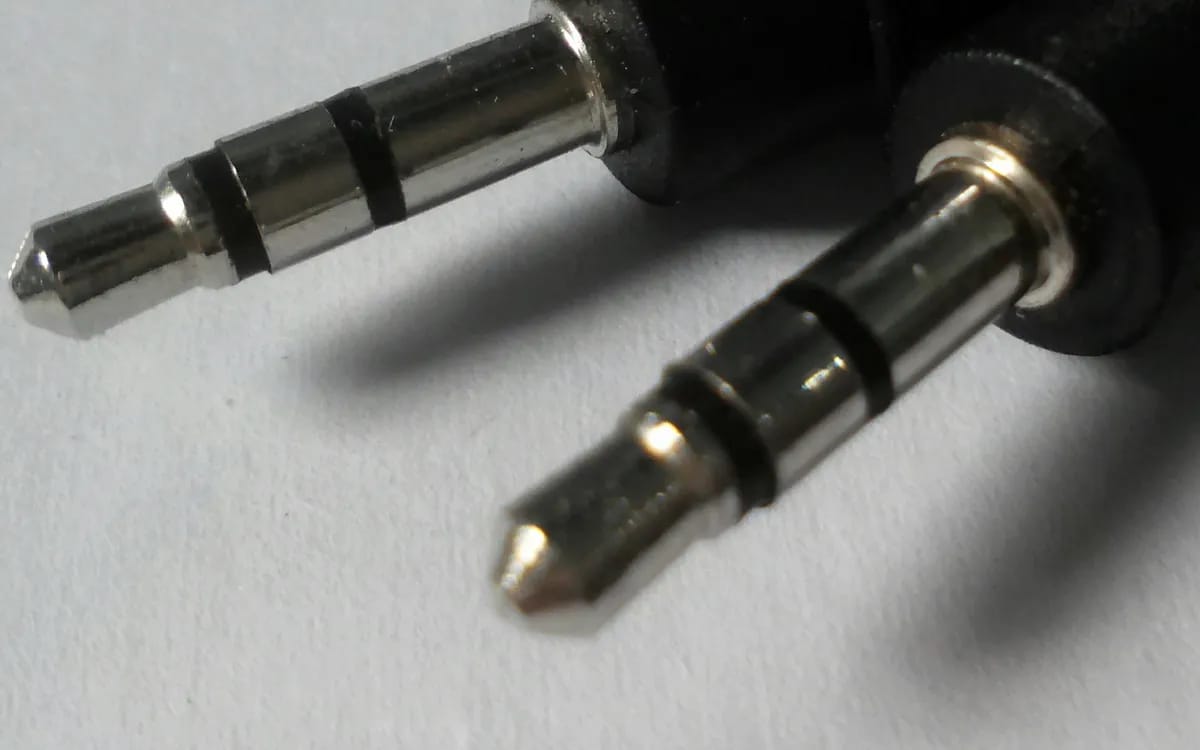
Check that the cable is really stereo: the mini-jack plug then has two black rings. A mono model would only carry one channel.
Each jack plugs into the jack input of its speaker. As the speakers are active, nothing else remains to connect except the mains power, one socket per speaker.
Test the adapter before the party with headphones: some models do not work with every phone. And it is better to try the complete cable the day before than to find out when the guests arrive.
Variant: a single cable and the XLR output
Second setup: plug the source into just one speaker, and link the second one to the first with an XLR cable. The speakers have an XLR output designed for this; it is used to link another speaker to the first. A pair of XLR cables is included in the rental: tick it when booking.
How to choose between the two? The two-jack setup keeps stereo, but requires the cable to reach each speaker from the phone. The XLR setup only needs one link between the speakers, and keeps the phone close to just one of them.
The sound is then mono: both speakers play the same thing. At a party, this is often an advantage: everyone hears the whole track, wherever they stand. With the two-jack cable, plug in only one jack, in the first speaker, and turn on mono audio in the phone’s accessibility settings. Without this, you would only hear one channel out of two.
Settings so the party doesn’t stop
- Connection order. Speaker volume at minimum, cables plugged in, music started, then volume raised gradually. Never the other way round.
- Phone volume. Set it high, without going as far as distortion: the signal is cleaner, and you then adjust the level with the speakers.
- Airplane mode or "do not disturb". Otherwise, a notification or a call can ring out across the whole room.
- Downloaded playlist. It does not depend on the network: no more dropouts in the middle of a track.
- Crossfade. Turn it on in the music app, to avoid silence between two tracks.
- Phone plugged into the mains. A battery that runs flat in the middle of the party stops the music.
Keep the phone out of reach of guests who might want to change the track. And plan for the end of the playlist: a list that is too short runs out, with an awkward silence in the middle of the party.
Streaming has technical limits as soon as you want to mix; the article can you mix with Spotify or Apple Music? covers it for those who want to go further than a simple playlist.
Computer, console, player: the RCA cables
A laptop generally has a mini-jack headphone socket: the cable is the same as for the phone. A source that outputs through RCA is connected differently, with the RCA to RCA cables included in the rental.
On a computer, set the system volume high and that of the playback software to a comfortable level, then adjust with the speakers, as for the phone.
The Pioneer XDJ-RX3 console is rented separately; it outputs through balanced MASTER XLR and through RCA, which connects it to the speakers with the cables included in the rental.
One last reminder: the pair is rented on its own, is picked up in Lyon 3 and is not shipped. The phone cable, for its part, is bought beforehand, not after the appointment.
More in this section
 DJ & sound system
Speakers at a party: stands, cables and volume without incident
Flat ground, cables taped to the floor, one socket per speaker, no rain, protected ears, neighbours warned: safety rules for a pair of speakers at a party.
5 min read DJ & sound system
Speaker pair: do you need a subwoofer, a mixer or a mic?
A pair of speakers, one source, and nothing else? When to add a mixer, a mic or a subwoofer, and what Fox Rider does or does not rent.
5 min read DJ & sound system
Transporting a pair of speakers by car
Measure the boot, wedge the speakers in their covers, carry them with two people, avoid heat and cold: the trip there and back, from pickup in Lyon 3 to return.
5 min read