
DJ & sound system
Connecting a turntable or a phone to a Soundboks
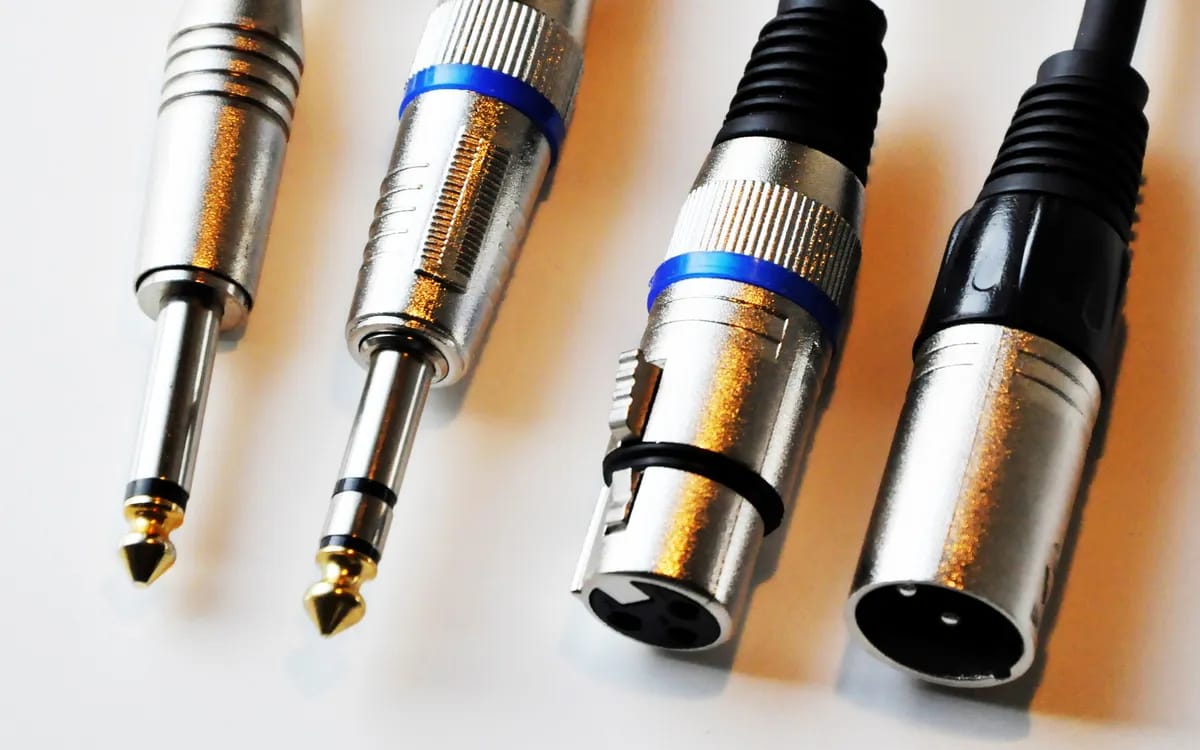
On a Soundboks 4, a phone connects over Bluetooth or with a 3.5 mm mini-jack cable to the AUX input. A home vinyl turntable with a built-in preamp connects with an RCA to 3.5 mm mini-jack cable. A turntable without a preamp, such as the Technics SL-1210 MK2, first needs a phono preamp: the Soundboks has no phono input.
Watch the mains supply too: the Pioneer XDJ-RX3 console and Technics turntables run on a power outlet, not on battery. The speaker is picked up at Lyon 3, with no shipping, handed over with a charged battery; a Shure SM58 microphone is available as an option and plugs straight into the speaker, €5 per microphone per rental (two at most), XLR cable supplied and microphone stand free of charge. No other cable is listed beyond the speaker and its battery: bring your own. The speakers for rent in Lyon are gathered on one page.
The rear panel, socket by socket
Soundboks calls the rear panel of the Soundboks 4 the “Pro Panel”. It includes:
- two balanced XLR / 6.35 mm jack combo inputs;
- one 3.5 mm mini-jack input, called AUX;
- one 3.5 mm mini-jack output, called AUX OUT, which links another speaker: Soundboks uses it, among other things, to link two TeamUp groups.
On top of that there is Bluetooth 5.0. There is neither an RCA input nor a phono input. That constraint decides everything: depending on your source, you will need an RCA to mini-jack cable, or an intermediate device. To identify the connectors, read our guide to XLR, jack and RCA cables.
A phone: Bluetooth or cable
Over Bluetooth, the phone must be paired in its own Bluetooth settings. The Soundboks app then controls the volume, the equalizer and the sound profiles, but it does not stream the music: without pairing in the settings, nothing comes out. Soundboks does not publish a Bluetooth range, so we do not give one: keep the phone close to the speaker.
With a cable, a 3.5 mm mini-jack connects the phone’s headphone output or adapter to the AUX input. If your phone no longer has a headphone jack, you need a USB-C or Lightning adapter. The cable spares you from relying on the wireless link, but it ties you to the speaker. In both cases, turn off the phone’s notifications before the party: a message or a call would come through the speaker, and charge the phone before you leave. To connect a phone to a speaker without Bluetooth, such as the RCF ART 912-A pair, see our article on connecting a phone without Bluetooth.
A home vinyl turntable
Many home turntables have a built-in preamp: the manual for yours says so. In that case, the RCA output carries a signal the speaker can play. As the Soundboks has no RCA input, you need an RCA to 3.5 mm mini-jack cable, plugged into the AUX input. For details, see our article on connecting a vinyl turntable.
Technics SL-1210 MK2: a phono preamp first
The Technics SL-1210 MK2 turntables output a phono signal, on RCA sockets, with a ground wire. This signal is too weak to go straight into a speaker: it first goes through a phono preamp, for example the PHONO input of a mixing desk. You must provide that mixer or preamp yourself. If you already own a mixer with PHONO inputs, only the cables remain to be gathered; our article on choosing the mixer details the criteria.
The ground wire connects to the terminal provided on the preamp or the mixer. Then the output of the preamp or mixer goes to the Soundboks inputs, with the cable that matches its sockets: a stereo output on two plugs, left and right, connects to the two combo inputs, one plug per input. The turntables need a power outlet, like the mixer. The complete chain is therefore: turntable, phono preamp or mixing desk, then Soundboks. Each link adds a cable, a connection and a possible source of trouble: test the whole setup before the event.
The XDJ-RX3 console: MASTER output over XLR
The Pioneer XDJ-RX3 console has a balanced MASTER output over XLR. It outputs in stereo, on two XLR plugs, left and right: plug them into the two XLR / 6.35 mm jack combo inputs of the Soundboks, with two XLR cables. With a single cable, only one channel would come through. This console runs on mains power only. It also has RCA outputs, but the Soundboks has no RCA input: the XLR output is the direct route.
A DJ party outdoors with no power outlet is therefore not possible with the XDJ-RX3 or the Technics: the Soundboks battery does not power them. An outlet is needed close by for the source, even if the speaker plays on battery. If you want to pair several Soundboks with TeamUp, the wired source plugs into the HOST speaker, the others simply playing the sound.
The order to follow before plugging in
- Turn the Soundboks volume down to the minimum, and the source’s volume too.
- Plug the cable into the source, then into the speaker, without touching the volume.
- Start the music and raise the speaker volume in steps.
- Then adjust the source, without pushing the bass.
These steps prevent a pop when connecting and give you time to listen before the sound gets loud. If no sound comes out, first check the input used, the source selected on the device, then the cable. For other practical questions, the rental period runs from 1 to 7 days, the price depends on the duration and is shown on the product page, the security deposit is settled on site at handover and returned after a check on return if the equipment is handed back in good condition.
More in this section
 DJ & sound system
Soundboks 4: battery life and spare battery
The figures announced by Soundboks (40 hours, 6 hours), what drains the battery, USB-C charging and the right time to take the spare battery.
4 min read DJ & sound system
Battery speaker: making an outdoor evening work
Placement, volume in steps, battery margin, cool nights and rain: the settings that matter for an evening outdoors with a battery-powered speaker.
4 min read DJ & sound system
Garden parties and picnics: playing music outdoors, and the rules
Neighbourhood noise, night-time disturbance, park rules, municipal orders: what to know in France before plugging in a speaker outdoors, and the common mistakes to avoid.
5 min read